Which way to use
Pick by what you are trying to do. All four work on Windows 10 and Windows 11.
- 1To see what is inside PSD files while you browse folders, give File Explorer a PSD thumbnail handler such as Design Previewer.
- 2To look at one PSD and its layers without installing anything, open it in Photopea in your web browser.
- 3To open PSD files with a free program on your PC, use GIMP.
- 4To edit PSD files in a free professional app, use Affinity.
Why Windows cannot open PSD files on its own
PSD is Photoshop’s own format. The Photos app and Paint that come with Windows do not open it, and File Explorer has no way to draw a thumbnail for it, so every PSD in a folder shows the same icon.
Installing Photoshop does not change that. Double-clicking a PSD then opens Photoshop, but File Explorer still cannot show what is in the file, which is why a folder of PSDs looks the same with or without Creative Cloud.
See PSD files in File Explorer, without opening them
If what you need is to find the right file, opening each one is the slow way. A thumbnail handler lets File Explorer show the artwork itself in every folder, and the preview pane shows the selected file large.
Design Previewer adds one for PSD, PSB, PDD and PSDT files. It reads the small preview Photoshop saves inside each file, so even a large PSB appears almost at once, and it never changes the file.
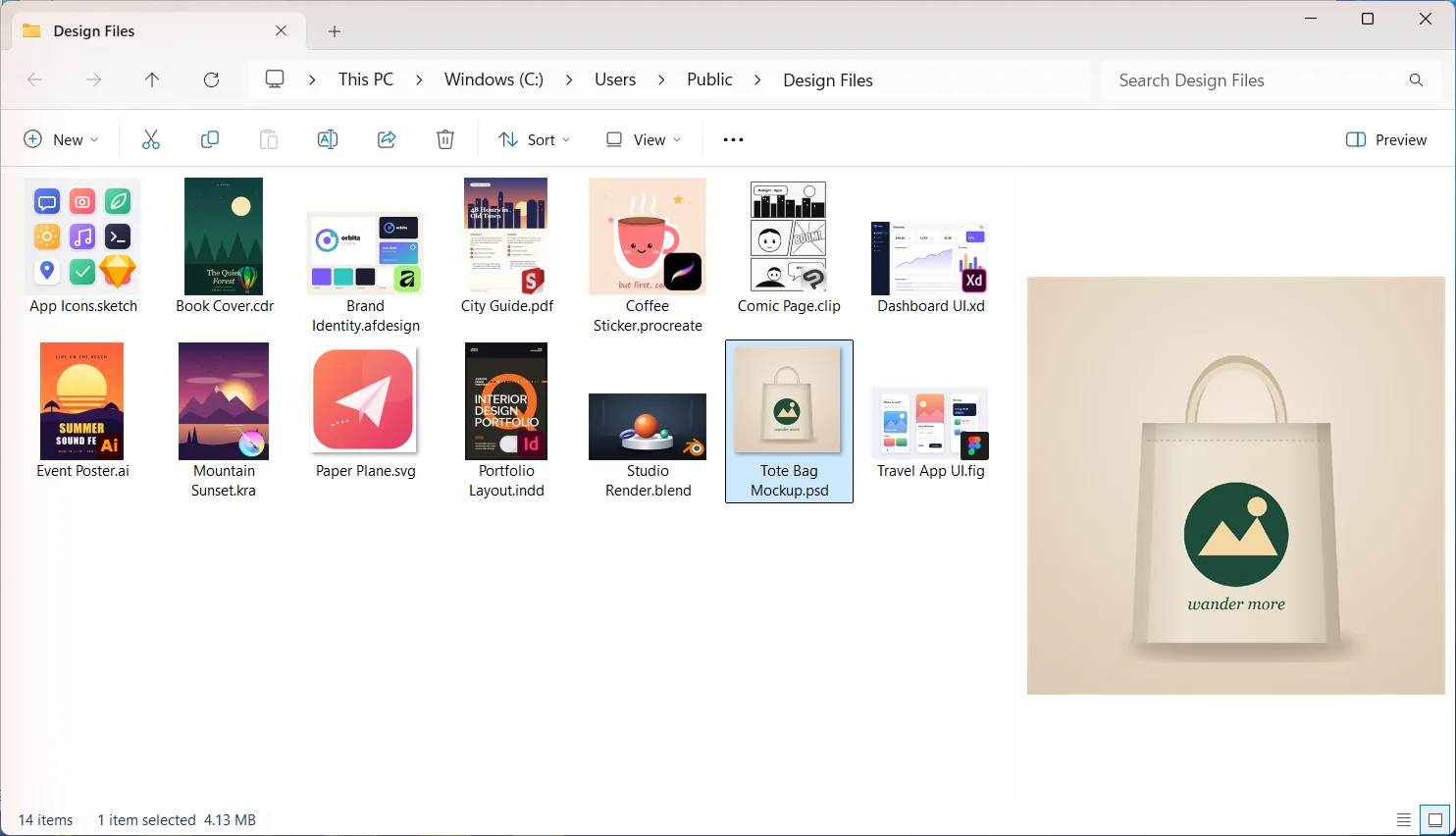
- 1Install Design Previewer. It is free for 15 days, with no account and no card.
- 2Open a folder of PSD files and choose View, then Large icons.
- 3Select a file and press Alt+P to open the preview pane.
Open a PSD in your browser with Photopea
Photopea is a free image editor that runs in a web browser and opens PSD files with their layers. Go to photopea.com, choose File, then Open, and pick the PSD, or drag the file onto the page.
It suits a quick look at one file, or a PC where you cannot install software. For a whole folder it is slow, because every file has to be opened one at a time.
Open a PSD on your PC with GIMP
GIMP is a free, open-source image editor for Windows. It opens PSD files with their layers, and GIMP 3 improved its PSD import and export.
Features only Photoshop has do not always come across. Adjustment layers, smart objects and layer styles may look different or be flattened, so check the result before relying on it.
Edit a PSD for free with Affinity
Affinity, by Canva, is free for individuals and runs on Windows. Its makers say it brings PSD files in with "layers and structure preserved", which makes it the closest free choice when you need to change the file, not just look at it.
It is a full design app, so it takes longer to set up and learn than a viewer. For a quick look, Photopea or File Explorer is faster.
If a PSD still shows a blank thumbnail
A thumbnail can only be made from the preview Photoshop saved in the file. In Photoshop, open Edit, then Preferences, then File Handling, and set Image Previews to Always Save. Save the file again and its thumbnail appears.
 Read nextPSD thumbnails in Windows File Explorer